Physical sign fabrication · Text and SVG inputs · STL and DXF outputs · 8 languages

Physical sign fabrication software for production teams

Sign fabrication software: from vector artwork to physical signs

PROLED3D turns text, logos, symbols and SVG artwork into configurable parts for 3D signs, illuminated signs, channel letters and dimensional signage. Review the design in 2D and 3D, then export STL and DXF files for 3D printing, CNC or laser workflows.

InputsTEXT · SVG · DXF*
PROLED3D2D + 3D
OutputsSTL · DXF · ZIP

* DXF input is used by the Neon Flex workflow.

  • TEXT + SVGvector inputs
  • STL + DXFfabrication outputs
  • 2D + 3Dproduction previews
  • 8languages
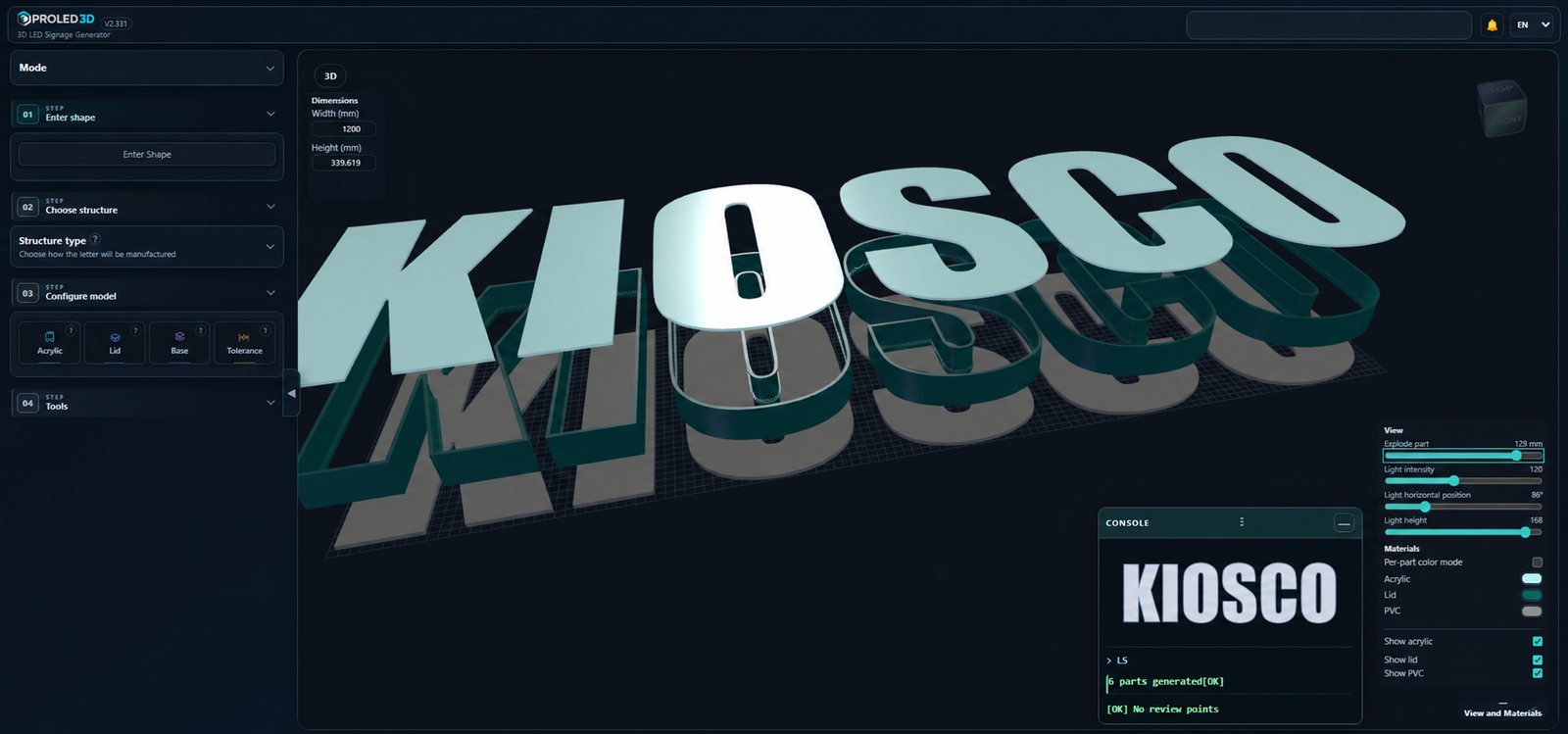
PROLED3D workspace previewing a configurable 3D sign and its production parts
Current interface

Exploded 3D view with lid, body, base and material controls.

From workshop bottleneck to repeatable workflow

Model the sign, not every production part from scratch.

Traditional preparation repeats offsets, walls, clearances, exports and checks across every project. PROLED3D centralizes those production decisions in a workflow developed from real sign-shop experience.

01Manual preparation

Repeated geometry and disconnected files

  • Rebuild walls, lids and bases project by project.
  • Prepare acrylic or PVC cutting paths separately.
  • Move between modeling, inspection and export tools.
  • Correct fit only after checking the real material and machine.
02With PROLED3D

One configurable production workspace

  • Start from text or clean SVG artwork.
  • Choose a compatible sign structure and configure manufacturing parameters.
  • Inspect geometry in 2D and 3D before export.
  • Organize STL and DXF deliverables in the project export.

Design-to-production workflow

Four steps from artwork to fabrication files.

Keep the production logic visible from the first path to the final export.

  1. 01
    IN

    Enter text or load artwork

    Create text with the available fonts or upload an SVG. Neon Flex uses DXF centerline paths.

    TEXT · SVG · DXF*
  2. 02
    CFG

    Choose and configure a structure

    Select a letter family and adjust lid, base, acrylic, PVC, walls and clearances for the job.

    L · F · C · P
  3. 03
    2D

    Review and prepare

    Inspect 2D and 3D views, edit nodes, add perforations and use the available preparation tools.

    2D · 3D
  4. 04
    OUT

    Export the project

    Generate the STL and DXF files related to the selected structure and keep the project output organized.

    STL · DXF · ZIP

Current tools

A production bench inside the browser.

Each operational tool supports a specific part of file preparation in one connected workflow.

T01Available

3D sign, logo and channel-letter generator

Build configurable physical-sign parts from text, logos or SVG artwork, choose an available structure family and inspect the result before export.

  • Benefit: keeps structure and fit settings in one project.
  • Files: TEXT / SVG → STL / DXF
PROLED3D generator for 3D signs, logos and channel-letter structures
T02Available

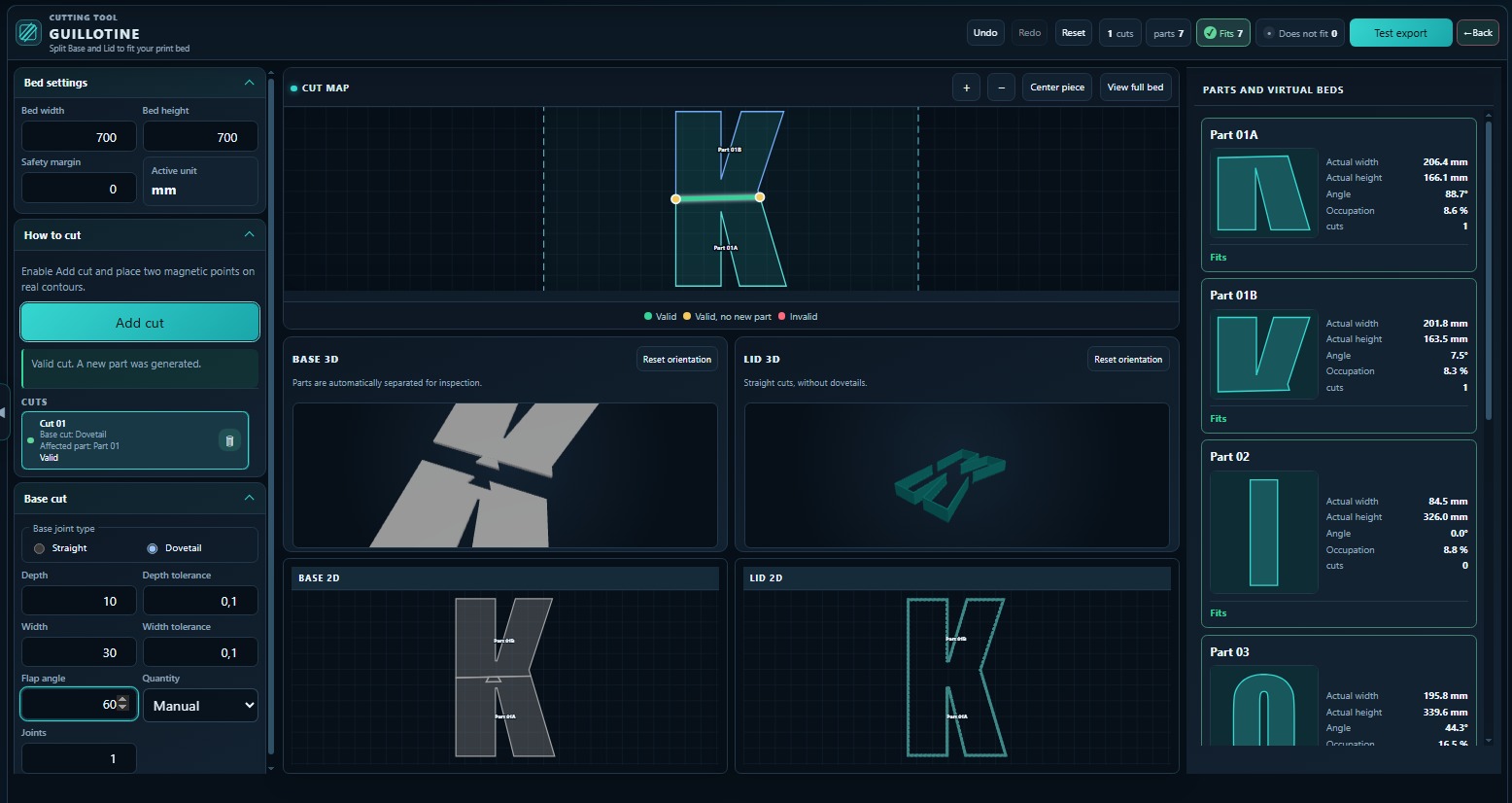
Guillotine

Divide base and lid parts according to the configured print-bed size, with straight or dovetail-style joints where available.

  • Benefit: prepares oversized parts for the printer bed.
  • Files: STL
View feature details
PROLED3D Guillotine STL cutting tool
T03Available

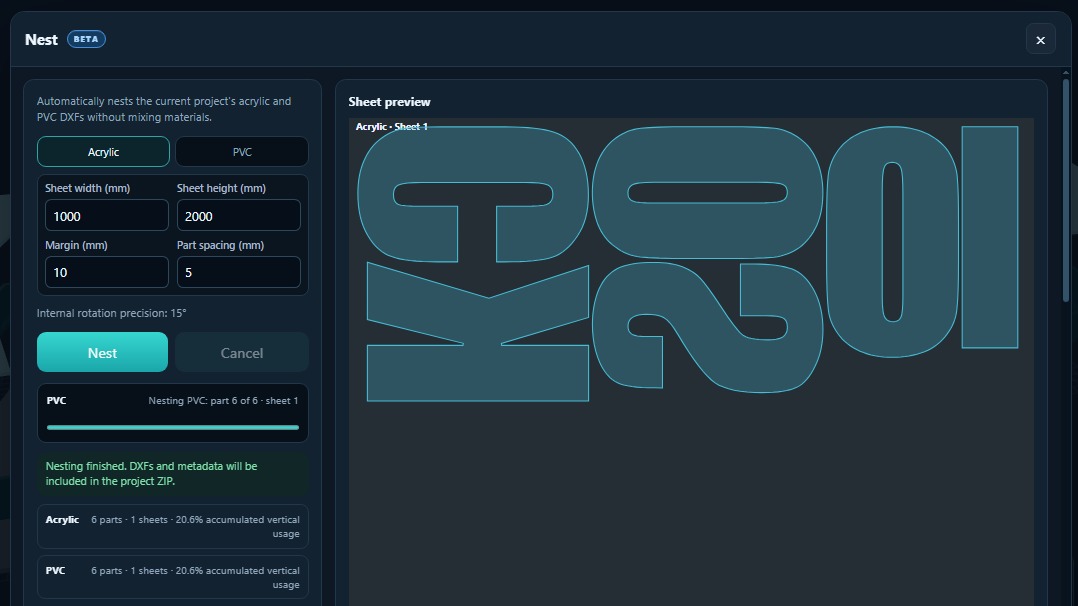
Automatic nesting

Arrange current-project acrylic and PVC DXF parts on separate sheets without mixing materials.

  • Benefit: organizes cutting layouts and related metadata.
  • Files: DXF · ZIP
View feature details
PROLED3D automatic nesting for acrylic and PVC DXF parts
T04Available

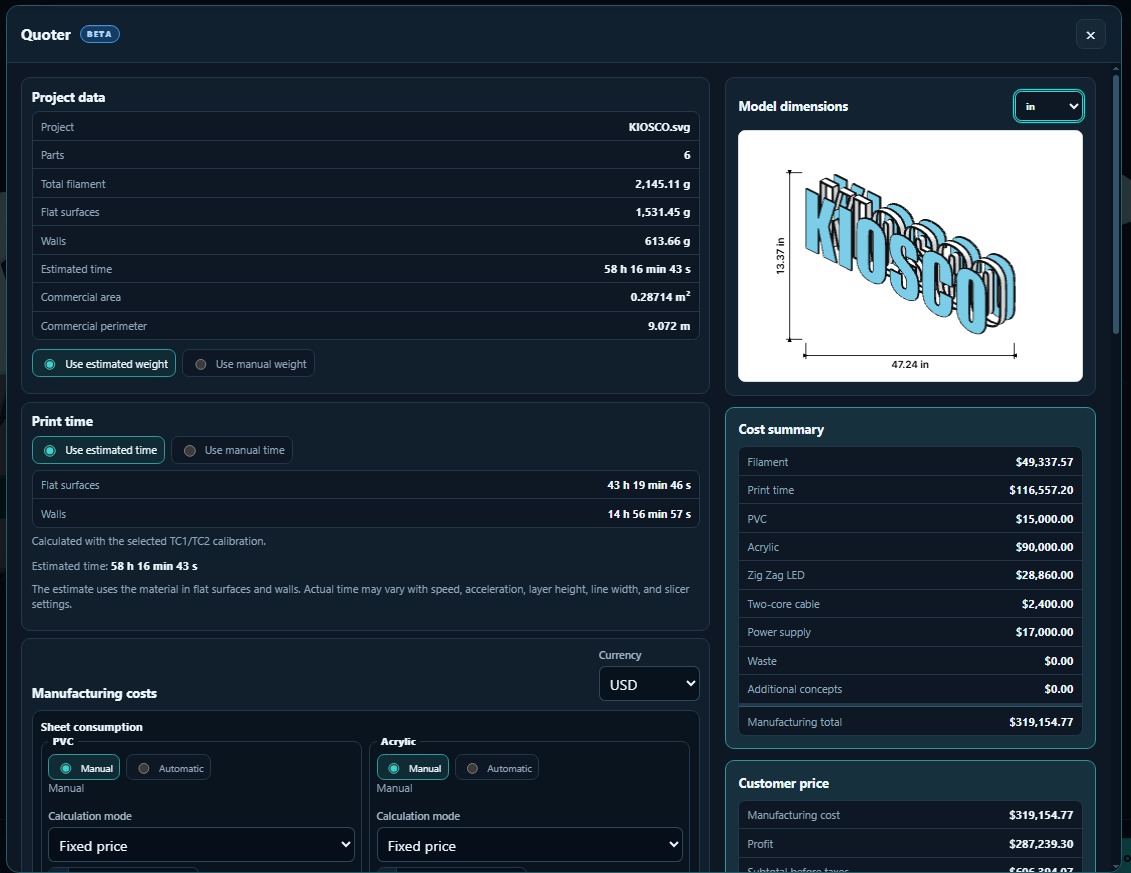
Project quoter

Estimate manufacturing inputs with project dimensions, material, print time, electrical components, waste, margin and taxes.

  • Benefit: connects model data with a configurable shop estimate.
  • Related: project data
View feature details
PROLED3D project Quoter with manufacturing cost summary
T05Available

Node editor and perforations

Edit paths, add or remove nodes, and prepare holes or base cuts directly in the project view.

SVG · 2D
T06Available

Neon Flex

Load DXF centerline paths, configure the channel and add tunnels or holes, then export the result.

DXF → STL*
T07Available

Curve optimizer

Simplify vector paths, reduce unnecessary nodes and keep curves manageable for the production workflow.

VECTORView feature details
T08Available

Organized project export

Bundle the generated parts and related files so the production handoff remains connected to the project.

STL · DXF · ZIP

Files and fabrication

One model, several production paths.

PROLED3D prepares geometry for the machines already used in a sign shop. It does not replace slicing, CAM setup, material tests or machine safety checks.

INPUT 01TEXT / SVG

Text and clean vector artwork define the letter or logo contours for the main generator.

INPUT 02DXF*

DXF centerlines feed the separate Neon Flex workflow.

CONFIGUREProduction geometry

Structures, wall values, lid, base, acrylic, PVC and tolerances are configured in the project.

OUTPUT ASTL

3D parts for slicing and manufacture on a suitable 3D-printing workflow.

OUTPUT BDXF

2D profiles for acrylic or PVC preparation in a compatible CNC or laser workflow.

SVGDXFSTL3D printingAcrylicPVCCNCLaserLED assembly

Made for fabrication teams

For the people who turn files into physical signs.

Use the same project language across design, printing, cutting and assembly.

A01

Sign shops and channel-letter workshops

Prepare dimensional lettering, LED signs and shop-ready production files.

A02

3D-printing operators

Review printable parts, configure fit values and divide oversized geometry when required.

A03

CNC and laser operators

Receive DXF profiles for acrylic and PVC, then apply the machine and material setup used by the shop.

A04

Production designers

Move vector artwork into a manufacturing-focused structure without rebuilding every component manually.

Workflow comparison

Manual CAD preparation vs. PROLED3D.

The difference is not the craft: it is where repetitive geometry, checks and exports are organized.

Manual workflow and PROLED3D comparison
TaskManual workflowPROLED3D
StructureModel components project by project.Select a family and configure parameters.
FitBuild offsets and clearances into the geometry.Adjust the available tolerance and material values.
InspectionReview across separate 2D and 3D tools.Review 2D and 3D views in the project.
Cutting layoutsArrange 2D pieces separately.Use automatic nesting for acrylic and PVC.
HandoffCollect and rename outputs manually.Export related project files together.

Simple access

Start free. Unlock every function with Premium.

PROLED3D has a functional free version and a single Premium price confirmed by the product team.

FreeAvailable
USD 0to start

A functional way to enter the application and begin working with the available free experience.

Start free
PremiumAll functionality
USD 10per month

Access all PROLED3D functionality for the complete production workflow.

Get Premium

Prices are shown in US dollars. Payment taxes or conversion charges may depend on your location and payment provider.

Frequently asked questions

What sign makers need to know.

Clear answers about inputs, outputs, machines, plans and production tools.

Open the application →
What is sign fabrication software?

Sign fabrication software prepares geometry and production files for physical signs. PROLED3D turns text, logos and SVG artwork into configurable 3D sign parts and exports STL and DXF files for printing and cutting workflows.

Can PROLED3D convert SVG to STL?

Yes. PROLED3D uses SVG artwork to generate configurable 3D parts that can be exported as STL for slicing and 3D printing.

Can it generate DXF files for acrylic, PVC, CNC or laser cutting?

Yes. PROLED3D exports DXF geometry related to acrylic and PVC components. Review machine, tool and material settings in your normal CAM workflow before cutting.

Does PROLED3D accept DXF as an input?

Yes. DXF input is available in the Neon Flex workflow, while the main sign-structure workflow accepts text and SVG.

Do I need to install CAD software?

No. PROLED3D runs in a modern web browser. Slicing, CAM setup and machine operation still use the tools required by your production equipment.

Which files does PROLED3D export?

Depending on the tool and structure, PROLED3D exports STL and DXF files and can organize project output in a downloadable package.

Can I configure fit and manufacturing tolerances?

Yes. The available parameters include lid, base, acrylic, wall and clearance values. Always verify fit with your own printer, material and process.

Is Neon Flex available?

Yes. Neon Flex accepts DXF paths and provides controls for channels, tunnels and holes. PROLED3D is continually improved while remaining fully operational.

Is there a free plan?

Yes. PROLED3D has a functional free plan so sign makers can start working in the application.

How much does PROLED3D Premium cost?

PROLED3D Premium costs USD 10 per month and includes all functionality.

Ready for the next file set?

Take your sign project from vector artwork to production.

Open PROLED3D in your browser, configure the physical-sign structure and prepare STL and DXF files for your shop workflow.

Open PROLED3DFree plan available · Premium USD 10/month